Best Outdoor Security Camera Without Subscription (2026 Guide)
Finding a reliable outdoor security camera used to mean getting locked into a mandatory monthly subscription just to view your recorded footage. Fortunately, top smart home brands now offer advanced outdoor security cameras with local storage options, built-in local AI detection, and zero recurring fees.
This guide covers the top subscription-free outdoor security cameras of 2026, key features to evaluate before buying, and how to set them up without hidden costs.
Table of Contents
ToggleQuick Specs Comparison
| Camera Model | Resolution | Local Storage Type | Night Vision | Ecosystem Support |
|---|---|---|---|---|
| EufyCam S330 (eufyCam 3) | 4K Ultra HD | Expandable (Up to 16TB via HomeBase 3) | Color Spotlight Night Vision | Apple HomeKit, Alexa, Google Home |
| Reolink Argus 3 Ultra | 4K 8MP | MicroSD Card Slot (Up to 128GB) | Color Night Vision | Alexa, Google Home |
| TP-Link Tapo C425 | 2K QHD (2560×1440) | MicroSD Card Slot (Up to 512GB) | Full-Color Night Vision | Alexa, Google Home |
| Lorex 2K Wi-Fi Battery Camera | 2K QHD | Pre-installed 32GB MicroSD | Color Night Vision | Alexa, Google Home |
Why Choose a Subscription-Free Security Camera?
- Zero Monthly Fees: Avoid paying $3–$10 per camera every month for cloud storage. Over two years, a subscription-free setup saves over $150–$300 per camera.
- Data Privacy & Control: Your video footage stays inside your home network on a local microSD card or dedicated home hub rather than external cloud servers.
- Continuous Recording Capability: Many local-storage cameras support 24/7 continuous recording to a local MicroSD or Network Video Recorder (NVR), a feature cloud-only battery cameras rarely offer.
Top Outdoor Security Cameras Without Monthly Fees
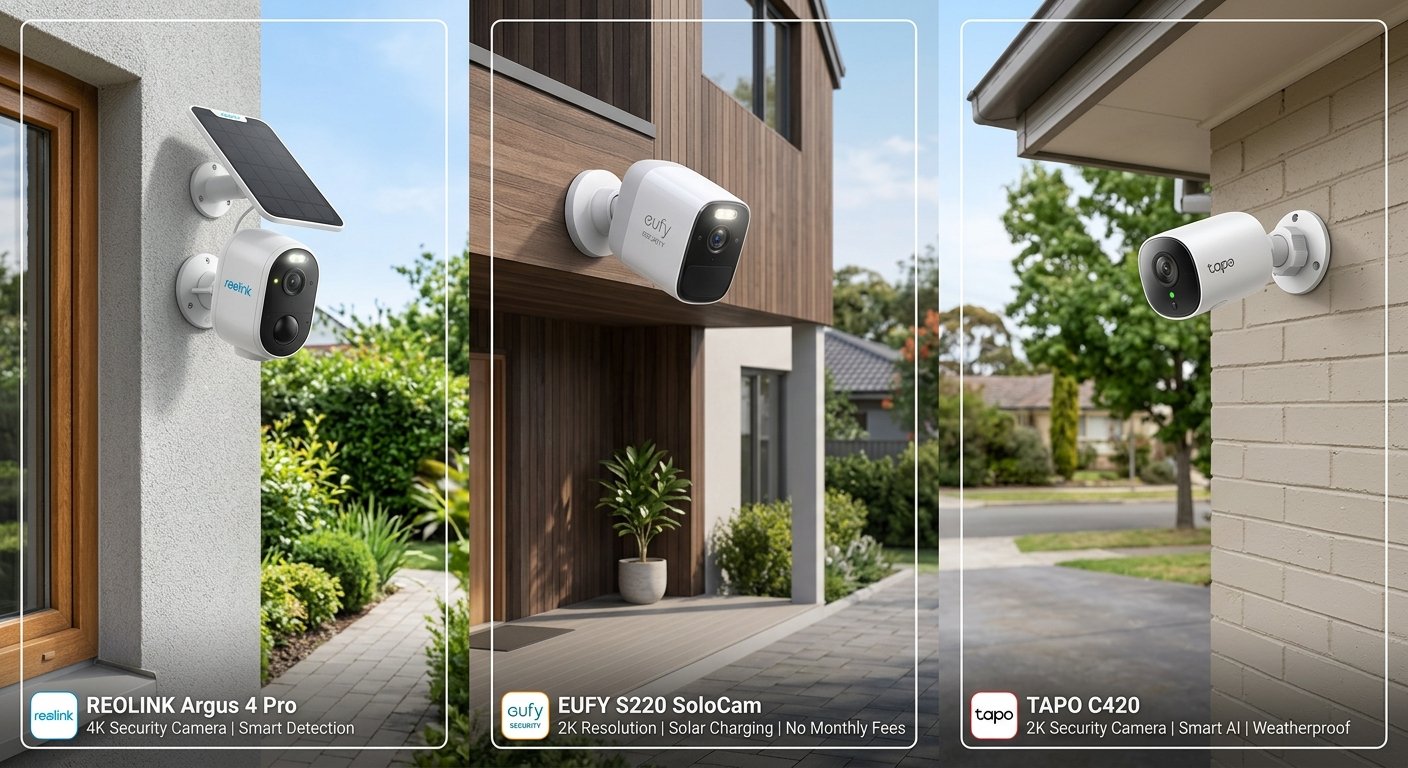
1. EufyCam S330 (eufyCam 3) – Best Overall 4K Solar Camera
The EufyCam S330 stands out with built-in solar panels, 4K detail, and centralized local storage via the HomeBase 3 hub.
- Key Highlights:
- Integrated solar panel requires just 2 hours of direct daily sunlight for continuous power.
- BionicMind™ AI provides local facial recognition, distinguishing family members from strangers.
- Expandable storage up to 16TB using a standard 2.5-inch SATA hard drive inserted into the HomeBase 3.
- Best For: Homeowners looking for a long-term, low-maintenance 4K setup with centralized storage.
2. Reolink Argus 3 Ultra – Best Value 4K Battery Camera
The Reolink Argus 3 Ultra offers crisp 4K resolution, dual-band Wi-Fi (2.4GHz / 5GHz), and direct local MicroSD recording without requiring a separate hub.
- Key Highlights:
- True 4K 8MP resolution captures clear license plates and facial details up to 30 feet away.
- Built-in motion spotlight and siren to active deter intruders.
- Standalone setup accepts local MicroSD cards up to 128GB.
- Best For: Quick installation on porch or driveway areas without buying additional hubs.
3. TP-Link Tapo C425 – Best Budget-Friendly Option
For under $100, the TP-Link Tapo C425 packs 2K resolution, a massive 10,000mAh rechargeable battery, and a magnetic base for flexible mounting angles.
- Key Highlights:
- Supports large local MicroSD storage capacity up to 512GB.
- Free smart AI detection identifies people, pets, and vehicles without paywalls.
- IP66 weatherproofing holds up against heavy rain, snow, and extreme heat.
- Best For: Budget-conscious buyers needing long battery life and free smart notifications.
Key Features to Consider Before Buying
Plaintext
Buying Considerations
├── Storage Type (Local MicroSD vs Home Hub / NVR)
├── Power Source (Rechargeable Battery vs Solar vs Hardwired)
├── Video Resolution (2K QHD minimum for license plates / faces)
└── Night Vision Quality (Infrared vs Color Spotlight)
- MicroSD vs. Local Hub Storage:
- MicroSD Cards: Cost-effective and standalone, but if someone steals the camera, the card goes with it.
- Local Hub / NVR: Stores footage indoors safely inside your home network even if outdoor hardware is damaged.
- On-Device AI Detection: Ensure the camera performs person, vehicle, and animal detection locally on the chip. Some brands lock AI detection behind cloud subscriptions.
- Wi-Fi Stability: Outdoor cameras mounted through thick brick or concrete walls benefit from dual-band Wi-Fi (5GHz for speed, 2.4GHz for distance) or mesh extension.
Step-by-Step Setup: How to Avoid Subscriptions Entirely
- Insert a High-End Endurance MicroSD Card: Use a Class 10 / UHS-I High Endurance MicroSD card designed specifically for continuous security cameras (standard phone MicroSD cards wear out quickly under constant writing).
- Disable Cloud Free Trials: During app onboarding, decline cloud storage trial promotions so footage routes directly to your local storage device.
- Enable Push Notifications & Motion Zones: Set up activity zones around your driveway or walkway to prevent false alerts from passing road traffic.
Frequently Asked Questions (FAQ)
Can I view live footage away from home without a subscription?
Yes. Local-storage cameras stream live video to your phone app over encrypted peer-to-peer (P2P) connections anywhere you have internet access—100% free of charge.
What happens when the local storage card fills up?
The camera uses loop recording. Once full, it automatically overwrites the oldest un-saved footage with new clips, ensuring continuous operation.
How long does a 128GB MicroSD card last?
For motion-triggered recording, a 128GB card typically holds 3 to 6 months of event clips before looping. For 24/7 continuous 2K recording, it holds approximately 7 to 10 days of video.
Final Verdict
Upgrading your home security does not require locking yourself into perpetual monthly fees. For a complete 4K ecosystem, the EufyCam S330 offers the best expandable hub storage. If you want a quick, standalone installation on a budget, the Reolink Argus 3 Ultra or TP-Link Tapo C425 provide sharp resolution, local AI, and zero recurring monthly costs.
Looking for More Smart Home Upgrades?
Don’t stop here! We regularly update our site with hands-on reviews and buying guides to help you build a safer, smarter home on any budget. Check out our latest blog posts and buyer’s guides to discover the top-rated home automation tools for 2026